MNIST Digit Classifier — Draw → Predict
Train a classifier on MNIST (offline), export to TensorFlow.js, then run inference client-side with an interactive canvas.
What this demo shows
This page is a small end‑to‑end machine learning project: we train a neural network to recognize handwritten digits (0–9) using the MNIST dataset, then we ship the trained model to the browser so anyone can draw a digit and get a prediction instantly.
There are two phases. First is training (done offline in Python): the model learns from thousands of labeled examples and we track how its loss (error) drops and its accuracy rises over epochs. Second is inference (what you’re using here): the model’s weights are frozen, and your drawing is preprocessed into the same 28×28 format MNIST uses, then the model outputs probabilities for each digit.
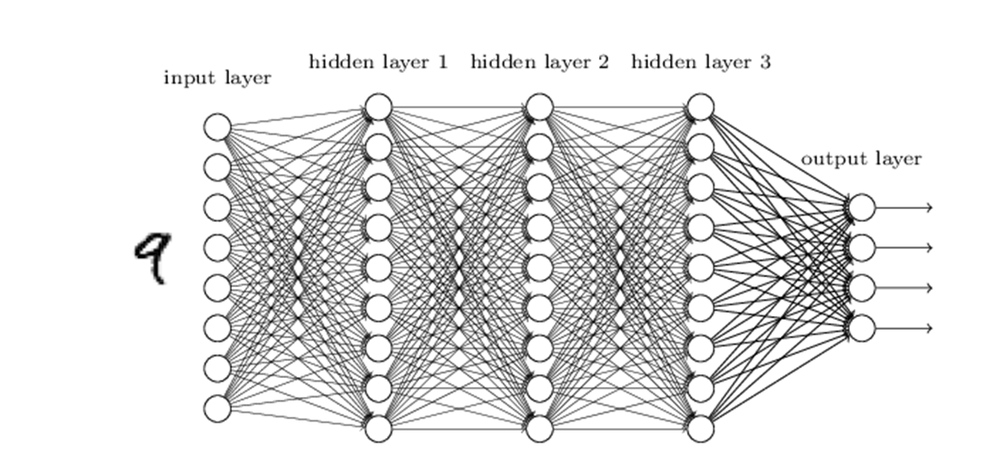
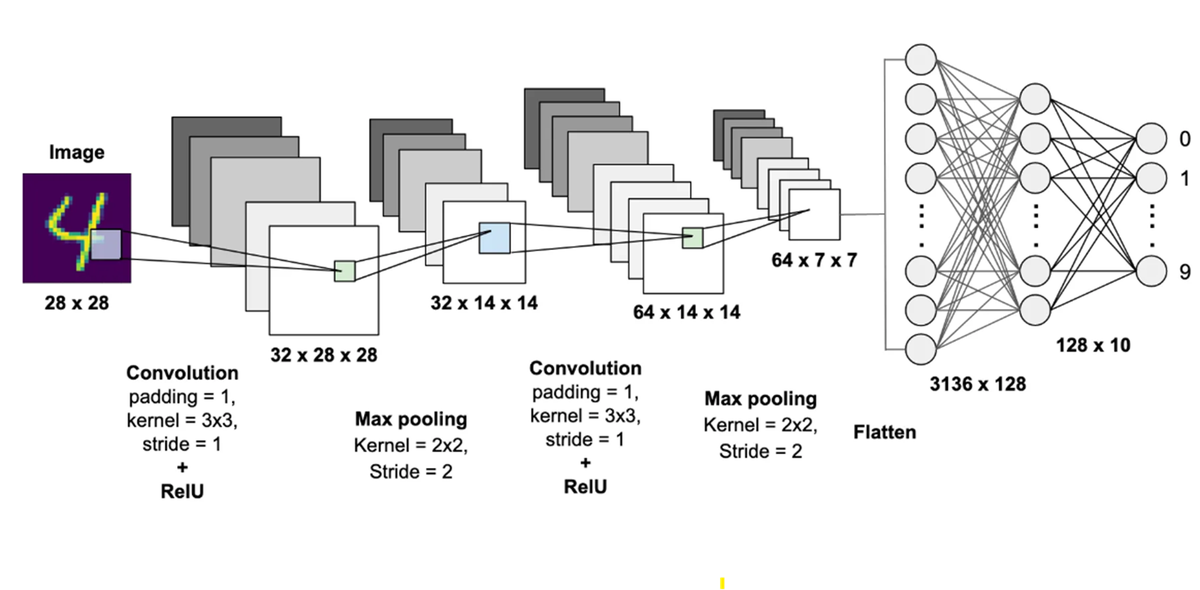
Our current model is a dense (fully‑connected) network. That means it treats the 28×28 image as a 784‑number vector. A CNN (convolutional neural network) keeps the 2‑D structure longer and learns small reusable “edge/curve” detectors that slide across the image; CNNs usually perform better on images, but a dense model is a clean baseline and still works well for MNIST.
Below, you can (1) review training curves and (2) try the live Draw → Predict interface. After that, the diagrams and PDF provide deeper technical context and implementation notes.
1) Training Metrics
Displays loss/accuracy per epoch from /assets/history.json.
2) Draw → Predict
Draw a digit (0–9). We preprocess to an MNIST-like 28×28 tensor and run inference with frozen weights.
Preprocess: crop → center → resize → normalize → (optional invert) → predict.
Neural network diagrams
Two common ways to map a 28×28 digit image to a prediction: a dense network vs a CNN.
Deploy checklist
Train in Python → export to TFJS → deploy static site on Netlify.
- Train a Keras model on MNIST in Colab.
- Convert to TFJS with tensorflowjs_converter.
- Copy model files into /model/.
- Copy training curves into /assets/history.json.
- Deploy this folder to Netlify (drag-and-drop or Git repo).
Full Write-up (PDF)
This is the long-form project write-up. If it doesn’t render in your browser, use the download link.